

I have a cousin.
Smart guy. Runs a small garment business in Dubai.
Every time we meet he says the same thing.
“Debarshi, this AI thing, where do I even start?”
I used to send him links to courses. YouTube videos. Insta reels.
Nothing worked.
So last month I sat with him for 2 hours and explained the whole thing from scratch.
In plain English.
No jargon. No “large language model” stuff.
Just: here’s what exists → here’s what it does → here’s which door to walk in first.
His mind was blown.
This article is that conversation. Written down.
If you’ve ever felt lost in the AI noise, this one’s for you.
First, let me kill one myth.
AI is not one thing.
Saying “I use AI” is like saying “I use the internet.”
The internet has Google. YouTube. Instagram. Banking apps. Email.
They’re all “the internet” but they do completely different things.
AI is the same.
Different types. Different tools. Different use cases.
Once you understand the map, everything clicks.
Here’s the map.
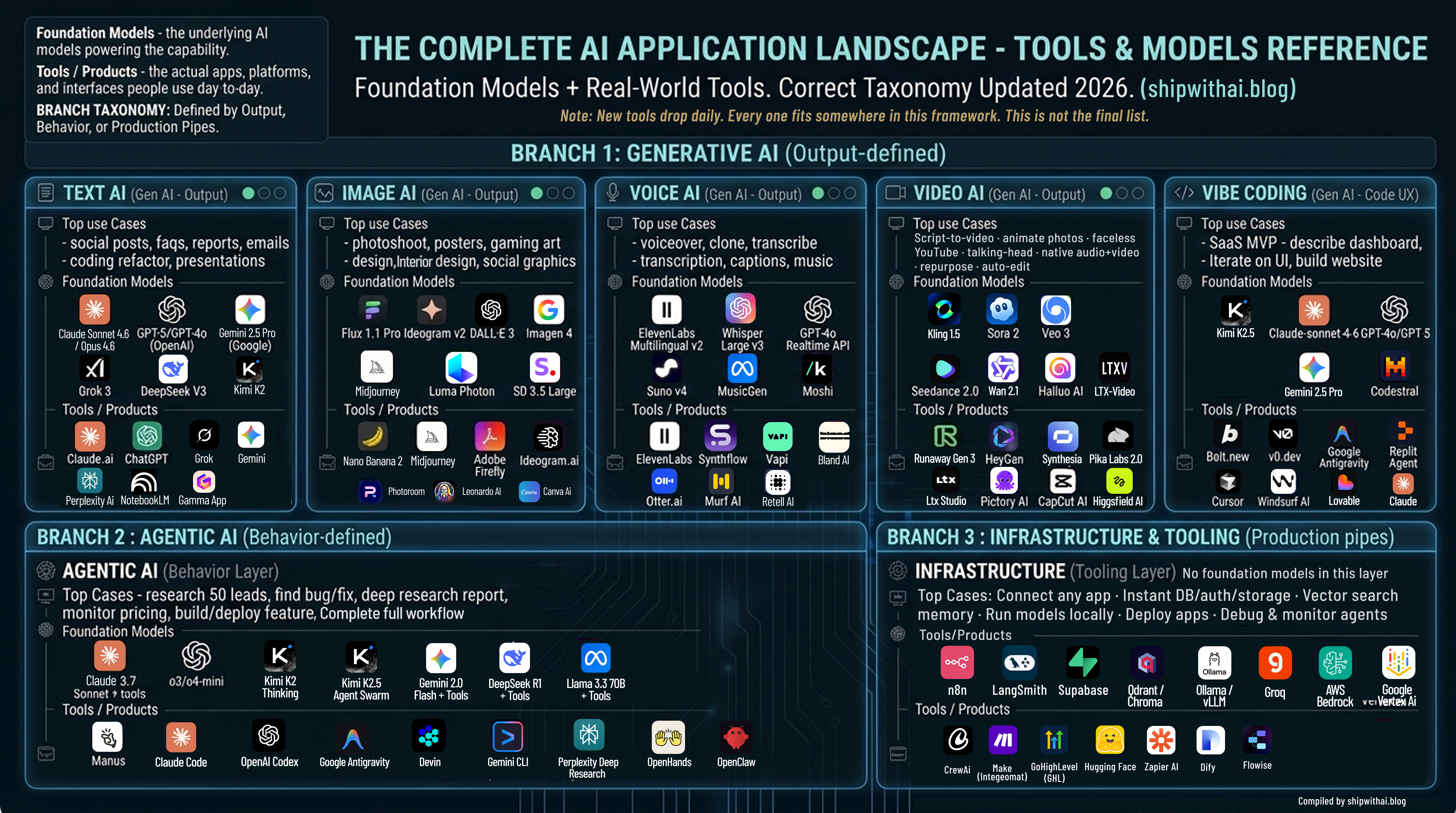
Before we go neighbourhood by neighbourhood, you can see above the full AI Landscape in one image.
This is the AI landscape as it actually stands in 2026.
Not the recycled chart that’s been floating around LinkedIn since 2023.
The correct version. With the right models. The right tools. The right taxonomy.
Branch 1 is Generative AI — defined by what it produces.
Branch 2 is Agentic AI — defined by how it behaves.
Branch 3 is Infrastructure — the pipes everything runs on.
Now, honest disclaimer.
New AI tools and models are launching every single day.
By the time you read this, 3 new ones have probably dropped.
The models might be updated.
It is literally impossible to keep up with everything.
But that’s not the point.
The point is the framework.
Once you understand which neighbourhood a tool belongs to — you know what it does, who it’s for, and whether you need it.
The tools will change. The framework won’t.
Now let’s break each section down.
Think of AI like a city.
Different neighbourhoods. Different jobs.
You don’t go to the hospital to buy groceries.
You don’t go to the film studio to get legal advice.
Each neighbourhood in the AI city does something specific.
Let me walk you through each one.
🟢 Neighbourhood 1: The Writing District
What it does: This is where AI reads, writes, summarises, and thinks.
Need to write an email? Come here.
Need to summarise a 40-page report? Come here.
Need to translate your website into Spanish, French, or Japanese? Come here.
Need to brainstorm 20 ideas in 2 minutes? Come here.
Real use cases:
Write a week of Instagram captions in 10 minutes
Turn a long client report into a 1-page summary
Draft a professional email when you don’t know how to start
Translate your product description into 5 languages
Build an entire presentation from rough notes
Write your website copy in an afternoon
Free tool to start with: Claude.ai or ChatGPT
Both free. Both excellent.
I personally use Claude for most of my writing and thinking work. It sounds more human. Handles long documents better than anything else I’ve tried.
The actual models powering this neighbourhood:
Claude Sonnet 4.6 / Opus 4.6 (Anthropic),
GPT-5 / GPT-4o (OpenAI),
Gemini 2.5 Pro (Google: 1 million token context window),
Grok 3 (xAI),
DeepSeek V3 (open-source),
Kimi K2 (Moonshot AI: incredible long context),
Mistral Large 2,
Llama 3.3 70B (Meta, free to run yourself).
The tools in this neighbourhood:
Gemini (Google’s interface: free, great for research)
Grok (xAI, free on X: great for real-time topics and trending news)
Microsoft Copilot (embedded inside Word, Excel, Teams: if you’re already in Microsoft, start here)
Perplexity AI (answers questions with actual sources, like Google but smarter)
NotebookLM (upload any document and have a conversation with it; Google’s hidden gem)
Gamma.app (describe a presentation topic, get a full deck in 60 seconds)
🎨 Neighbourhood 2: The Art Studio
What it does: This is where AI creates images from your words.
You type: “A photo of a bowl of soup on a brass plate, warm luxury lighting, food magazine style.”
It gives you a professional photograph.
No camera. No photographer. No $1000 product shoot.
Real use cases:
Create product photos without a photographer
Design social media posts without a designer
Make a poster with your text already inside the image
Generate 20 different ad creative versions in 1 hour
Visualize what your shop renovation could look like before spending money
Create character art and game visuals at scale
Free tool to start with: Nano Banana 2
This one I want to highlight specifically.
It lives inside Gemini, which you probably already have.
No extra signup. No subscription. Completely free.
You feed it a URL or describe what you want. It creates the image.
It’s powered by Imagen 4, Google DeepMind’s latest image model.
I’ve written a full step-by-step Nano Banana 2 guide. Check it out here.
The actual models powering this neighbourhood:
Flux 1.1 Pro (Black Forest Labs — the current realism benchmark),
Imagen 4 (Google DeepMind),
Midjourney v7 (artistic quality leader),
Ideogram v2 (the best for putting readable text inside images),
DALL-E 3 (OpenAI),
Luma Photon,
Stable Diffusion 3.5 Large (open-source, free to run).
The tools in this neighbourhood:
Midjourney (the gold standard for artistic images; stunning quality)
Adobe Firefly (the only major tool with commercial copyright safety; important for client work)
Ideogram.ai (best for posters, banners, anything with text inside the image)
Leonardo AI (huge in gaming, character design, and concept art)
Photoroom (remove backgrounds, replace scenes, edit product photos; very practical)
Canva AI (design and image generation together; great for non-designers)
🎙️ Neighbourhood 3: The Recording Booth
What it does: This is where AI handles everything related to sound.
Speaks. Listens. Transcribes. Clones voices. Creates music.
And now, answers your phone calls for you.
Real use cases:
Add a professional voiceover to your video without recording anything yourself
Clone your own voice and have it speak in 10+ languages
Transcribe a 1-hour client call into clean, searchable text notes in 3 minutes
Run an AI receptionist that answers calls, handles FAQs, and books appointments 24/7
Auto-generate captions and subtitles for all your videos
Edit a podcast by editing the text transcript (fix what you said by just deleting words)
Compose royalty-free background music for your content
Free tool to start with: Otter.ai
Start by transcribing one meeting. You’ll never take manual notes again.
The actual models powering this neighbourhood:
ElevenLabs Multilingual v2 (the TTS quality benchmark),
Whisper Large v3 (OpenAI: the open-source transcription standard the whole industry uses),
GPT-4o Realtime API (sub-300ms live voice),
Suno v4 (music),
MusicGen (Meta, open-source),
Moshi (Kyutai: open-source real-time dialogue model).
The tools in this neighbourhood:
ElevenLabs (the best voice cloning and text-to-speech tool, period!)
Bland AI (AI phone agents; outbound and inbound)
Retell AI (conversational AI calling; more developer-friendly than Bland)
Synthflow (no-code AI phone agent builder; build calling agents without writing code)
Vapi (voice AI platform; very popular with developers building voice workflows)
Descript (record a podcast, then edit it by editing the text; mind-blowing for content creators)
Murf AI (professional voiceover studio; great for ads and e-learning)
Suno / Udio (type a song idea, get a full song with music, lyrics, and production)
The AI phone agent tools — Bland, Retell, Vapi — are worth a special mention.
If you’re running an agency or a business with high inbound call volume, these three tools are quietly replacing entire call centre teams.
🎬 Neighbourhood 4: The Film Set
What it does: This is where AI creates and edits videos.
From a single photo. From a script. From nothing but a text prompt.
And now with the audio already included.
Real use cases:
Take a product photo → turn it into a 10-second video for Instagram Reels
Write a script → get a complete explainer video without filming anything
Create a talking-head video in any language — without being on camera
Build a faceless YouTube channel that posts 5 videos a week
Auto-cut a 1-hour recording into 10 short viral clips
Generate video AND audio together in one pass — no post-production
That last one is new.
Seedance 2.0 (ByteDance) and Veo 3 (Google) now generate audio and video at the same time.
Synchronized dialogue. Sound effects. Ambient audio.
All from a text prompt.
No editing software needed.
Free tool to start with: CapCut AI
Upload a video. Use the auto-caption and auto-edit features.
Completely free. Insanely powerful.
The actual models powering this neighbourhood:
Sora 2 (OpenAI: physics simulation + native audio),
Veo 3 (Google DeepMind: native audio champion),
Kling 1.5 (Kuaishou: best motion realism),
Seedance 2.0 (ByteDance: native audio+video in one pass),
Hailuo AI (MiniMax: strong motion, worth trying),
Wan 2.1 (Alibaba: top open-source video model),
LTX-Video (Lightricks, open-source).
Other tools in this neighbourhood:
Runway Gen-3 (professional VFX used by actual filmmakers and agencies)
HeyGen (create a talking-head AI avatar of yourself; multilingual)
Synthesia (corporate training and explainer videos at scale)
InVideo AI (paste a script or blog post — get a complete video)
Pictory AI (repurpose blog articles into videos automatically)
Opus Clip (upload a long YouTube video or podcast; AI cuts it into 10 short viral clips)
Pika Labs 2.0 (best for animating still images)
🔨 Neighbourhood 5: The Workshop
What it does: This is where non-technical people build actual software products.
No coding knowledge needed.
You describe what you want in plain English.
The AI builds it.
A real. Working. Deployable. App.
This is called Vibe Coding and it’s the most important shift in tech since the iPhone.
Not because of the technology.
Because of who gets to build things now.
Used to be: you need a developer to build software.
Now: you need an idea and a clear description.
Real use cases:
“Build me a booking system for my salon” → working website in 2 hours
“Create a dashboard showing my monthly sales” → done
“I need an internal tool where my team submits daily reports” → built
“Make a simple app where customers track their orders” → shipped
I’ve personally built multiple apps this way.
Zero lines of code written by me.
Free tool to start with: Lovable.dev
Describe your app. Watch it get built in real time.
The actual models powering this neighbourhood:
Claude Sonnet 4.6 (Anthropic: powers Lovable and v0.dev, the best for coherent multi-file UI),
GPT-4o / GPT-5 (OpenAI: powers Bolt.new and Replit Agent),
Kimi K2.5 (Moonshot: generates full multi-page websites from a prompt),
DeepSeek V3 (best open-source option for self-hosted setups),
Gemini 2.5 Pro (Google),
Codestral (Mistral: code-specialized).
The tools in this neighbourhood:
Lovable (my personal favourite; most polished output, best for SaaS products)
v0.dev (best for beautiful UI components, by Vercel)
Google Antigravity (Google’s new free agent-first IDE, launched late 2025, rapidly becoming developers’ favourite)
Replit Agent (great for adding features to existing projects)
Cursor (if you want more control; the #2 most-used coding tool globally)
Windsurf (AI IDE by Codeium; strong alternative to Cursor)
GitHub Copilot (the original, still the most widely used coding assistant globally)
🤖 Neighbourhood 6: The Operations Floor
What it does: This is where AI stops helping you and starts doing things for you.
Completely on its own.
You give it a goal.
It figures out the steps. Executes them. Comes back when it’s done.
This is Agentic AI — and it’s the most important thing happening in AI right now.
Here’s the difference in one sentence:
Generative AI is a talented employee who produces great work when you tell them exactly what to do.
Agentic AI is an employee who you give a project to, and they figure out everything themselves.
Real use cases:
“Research the top 50 restaurants in Bangalore, find contact details, draft a personalised email for each” → done while you sleep
“Monitor my competitor’s website every day and alert me when their pricing changes”
“Read all unread emails in my inbox and summarise what needs my attention today”
“Find 10 recent AI news articles, summarise each, and draft a newsletter” → ready in 10 minutes
“Find a bug in my codebase, fix it, write the tests, and open a PR for my review”
Free tool to start with: Manus
Give it a task in plain English.
It opens a browser, searches the web, reads pages, writes code if needed, and returns a finished output.
Like hiring an intern who works at the speed of a computer.
The actual models powering this neighbourhood:
Claude 3.7 Sonnet + tools (Anthropic, top agentic model),
o3 / o4-mini with tool use (OpenAI, best reasoning agent),
Kimi K2 Thinking (Moonshot: executes 200-300 sequential tool calls autonomously),
Kimi K2.5 Agent Swarm (Moonshot: coordinates 100 parallel sub-agents simultaneously),
Gemini 2.0 Flash + tools (Google: fast and low-latency),
DeepSeek R1 + tools (open-source reasoning),
Llama 3.3 70B + tools (Meta — open-source, self-hostable).
The tools in this neighbourhood:
Claude Code (the #1 coding agent; overtook GitHub Copilot and Cursor within 8 months of launch)
OpenAI Codex (cloud-based coding agent by OpenAI, 1.6 million weekly active users, runs your code in an isolated sandbox)
Google Antigravity (also here for its Manager View; dispatch multiple coding agents working in parallel)
OpenClaw (open-source personal AI agent, runs locally, connects to WhatsApp/Telegram/Discord, bring your own model. Fastest-growing open-source project in history with 250,000 GitHub stars in 4 months. Jensen Huang called it "the next ChatGPT." Note: has known security risks, not for beginners)
Devin (the first AI software engineer; builds entire features autonomously)
Microsoft Copilot Studio (enterprise agent builder, for large teams on Microsoft infrastructure)
Perplexity Deep Research (deep research reports on any topic, with citations)
ChatGPT Deep Research (same concept, OpenAI’s version)
OpenHands (open-source coding agent, free to run yourself)
🏗️ Neighbourhood 7: The Foundation
What it does: You’ll probably never see this neighbourhood directly.
But every AI product you use runs on top of it.
This is the infrastructure — the pipes, the databases, the automation connectors, the model hosting.
I’m including it because if you ever want to build your own AI workflow or product, you need to know this layer exists.
What’s here:
n8n — connect any app to any AI model. Build automated workflows visually. Open-source and free to self-host. This is what serious AI builders use.
LangGraph / AutoGen / CrewAI — frameworks for building multi-agent pipelines in code. These are NOT AI models. No intelligence of their own. They're the scaffolding that wires models, tools, and memory together into an autonomous workflow. Think of them as the plumbing behind the wall.
GoHighLevel (GHL) — the operating system for AI-powered agencies. CRM + email + SMS + AI phone agents + funnels in one platform.
Supabase — the database for your AI apps. Postgres + authentication + storage, ready in minutes.
Hugging Face — the single most important open-source AI hub. Every open-source model (Llama, DeepSeek, Flux, Whisper, Seedance, Kimi K2) lives here. Think of it as the library where all the free AI books are stored.
Vercel / Railway — where you publish your AI app so the world can use it.
Zapier / Make — the beginner-friendly version of n8n. Connect apps without code.
Groq — the fastest inference API available. When speed matters more than anything else.
You don’t need to use these on day one.
But once you start building, you’ll come back here.
So. Where do you start?
Pick one neighbourhood. Just one.
The one that solves a problem you have right now.
Spend one hour this week experimenting with a free tool from that neighbourhood.
Don’t try to learn everything at once.
That’s how people get overwhelmed and quit.
Here’s your cheat sheet:
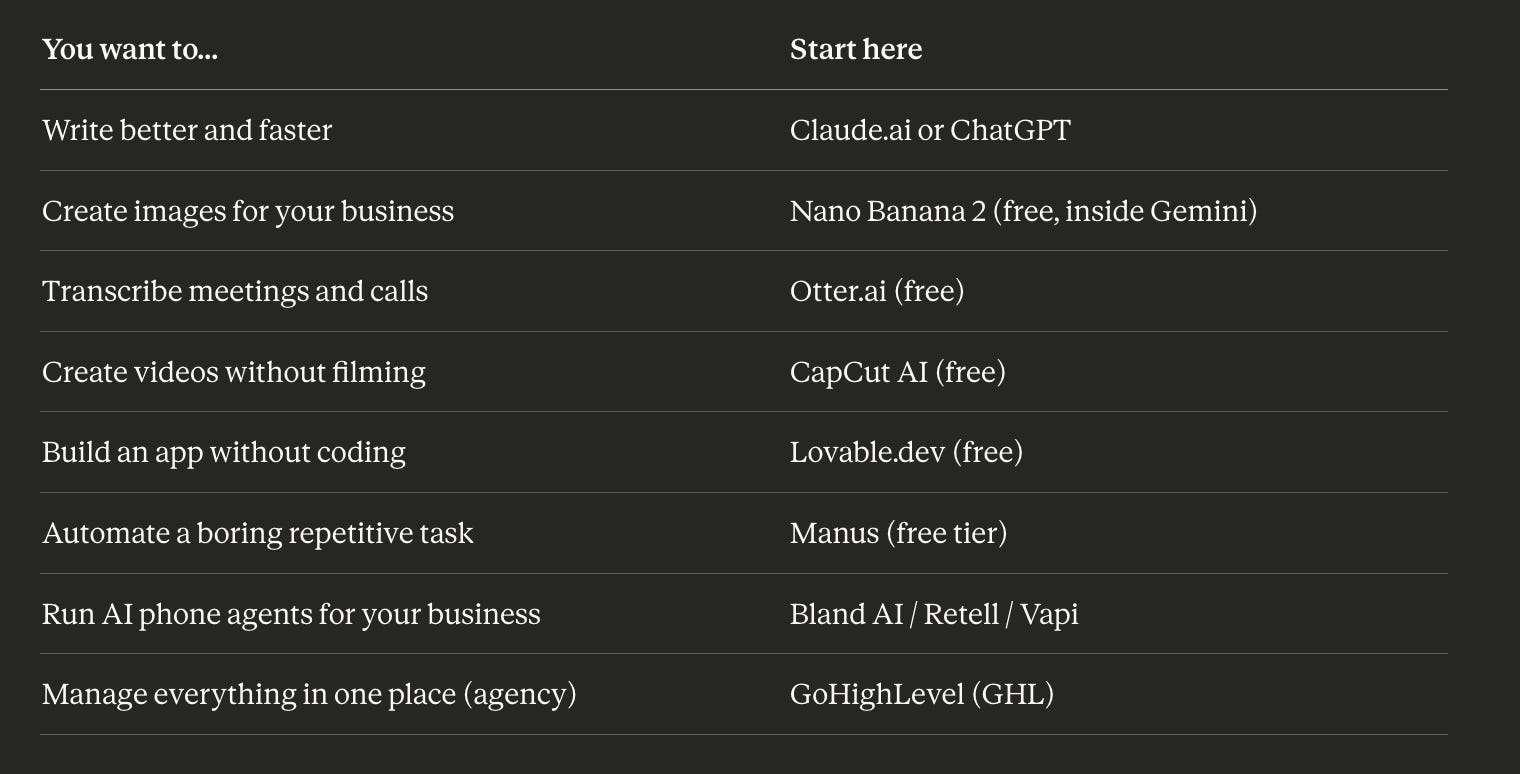
Start there.
One tool. One hour. One problem solved.
One more thing before you go.
Foundation Models are the brain. Tools are how you talk to the brain.
But here’s where it gets interesting.
The relationship between models and tools isn’t always the same.
There are actually three types.
Type 1 — The model IS the tool.
The same company builds the AI and the product you use.
Claude.ai. ChatGPT. Gemini. Grok. Midjourney.
You’re talking directly to the lab that built the intelligence.
No middleman.
Type 2 — The tool is built on someone else’s model.
A separate company takes a foundation model and wraps it into a product.
Lovable runs on Claude Sonnet 4.6.
Bolt.new runs on GPT-4o.
Gamma.app runs on GPT or Claude underneath.
Notion AI runs on GPT.
Different product. Same brain inside.
Which means when Anthropic improves Claude, Lovable gets better automatically.
You didn’t do anything. The engine just got upgraded.
Type 3 — The tool lets you pick the model.
These are model-agnostic platforms. You choose the brain.
Cursor lets you switch between Claude and GPT.
Google Antigravity supports Gemini, Claude, and GPT.
n8n connects to whichever model you plug in.
Same interface. Swap the intelligence underneath.
So when you’re evaluating any AI tool, ask two questions.
What model is powering this?
And what type of relationship am I dealing with?
That tells you everything about what you’re actually getting.
I’ve been building with AI tools for a few years now.
I’ve failed. A lot.
Built apps that didn’t work. Spent money on tools I didn’t need. Followed advice that sounded impressive but wasn’t practical for a business context.
Ship with AI exists so you don’t have to make the same mistakes.
Every week I break down what’s actually working: specific tools, specific use cases, real results.
Actual practitioner content from someone who builds with these tools every day.
Please let me know in comments what’s the problem you want to solve and which AI tool you would pick to solve that problem.
The list is not limited now, unending. But, this post of yours will clear one's outlook - which ones to use and why!